
Tetris NES, Deep Dive #2
The Story so Far…
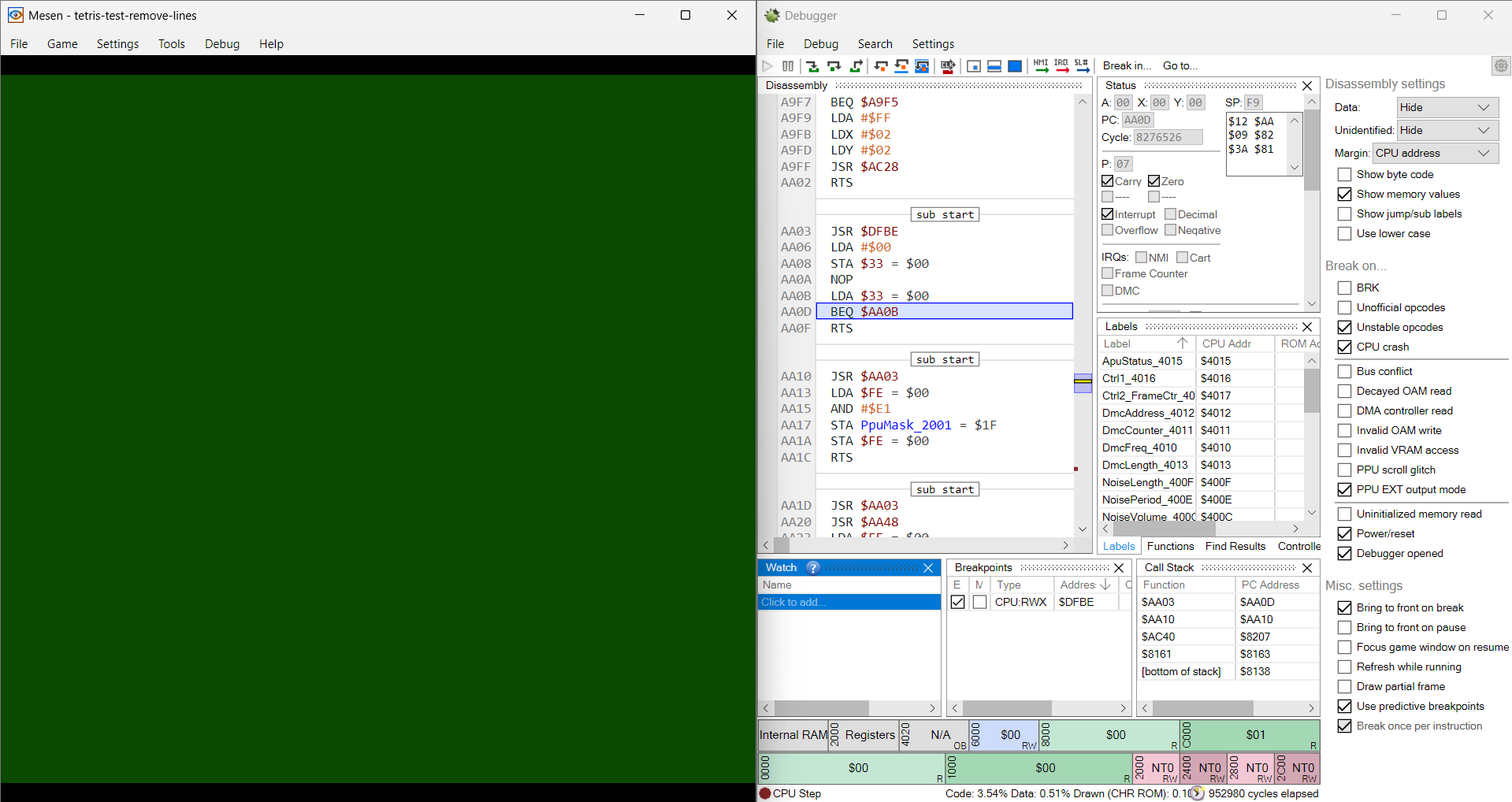
Since my last post on this project, I’ve made lots of progress in my Tetris ROM-Hack! Last post, I talked about my discoveries and studies involving the NES-emulator config file format, and how I greatly improved mine. I also talked about the difficulties with the original school project, mainly being that we had to translate our own decompilation of the ROM, which resulted in a highly volatile assembly ROM. It was so volatile, in fact, that adding any new code or data into the existing code would typically result in a green screen of death. We believed this to be the cause of important game vectors being overwritten, but couldn’t tell for sure:
How am I doing this ROM-Hack?
In my last post, I mentioned how I was still deciding between using an already decompiled version of the game, rather than making my own. Since then, I messed around with an already decompiled Tetris ROM, and have quickly decided to pursue finishing the original project with this decompilation!
It is… FAR easier to work with. For starters, the creators of this decomp were able to divide the files into sections like RAM, constants, tilesets, and the main code. On top of that, variables are all properly named, and there are comments everywhere. Reading and understanding the code has never been easier! On top of that, they’ve even gone the extra effort and labelled the code and data that is unreferenced and unused.
I’m also able to justify using this decomp since the overall aim of the project has changed. See, the original project was a school assignment, meant to test our abilities working with decompilations. Now, I’m far more interested in just getting a ROM hack to work! It’s different goals, which I think justifies different methodologies.
New Discoveries?
This decomp was able to help me figure out an even more likely cause for that constant green screen of death. Turns out, our original assumption that code or data was being offset might’ve been completely correct. Check this out, in the decomp, they include an OAM content lookup table, basically a table that stores certain information for sprites. However, some of the entries in that table are unused, like so:
oamContentLookup:
        .addr   sprite00LevelSelectCursor
        .addr   sprite01GameTypeCursor
        .addr   sprite02Blank
        ...
        .addr   sprite13LPieceOffset
        ...
...
; Unused, but referenced from unreferenced_orientationToSpriteTable
sprite13LPieceOffset:
        .byte   $08,$7C,$02,$F8,$08,$7C,$02,$00
        .byte   $08,$7C,$02,$08,$10,$7C,$02,$F8
        .byte   $FF
Deleting the sprite13LPieceOffset data and its entry in the OAM content lookup table would help increase space and remove unnecessary code and data. So, I deleted it and… nothing seemed to change in the game. I decided to keep continuing with the deletions, one at a time, still not seeing any glitches in the game. Eventually, after a bit more clean-up, the green screen of death came back!
I realized that, while the entry itself wasn’t being used, there was still code that was depending on the table being a certain size, or certain entries being offset by a certain amount. When I went back, I replaced all the entries in the table I had deleted with the .addr sprite02Blank entry. This fixed everything!
My theory is that when we were removing or adding certain lines of code or data into the middle of preexisting code, our assembler was letting that offset ripple throughout the rest of the code! Tables were no longer in the exact address that the code was expecting, etc, etc. I now believe that what happened with my OAM deletions is what likely happened back then, except propagated throughout the entire code.
Progress Made
I was able to remove at least 220 bytes of unused OAM content, and another 964 bytes from an unused sprite-staging function, resulting in 1,184 bytes of saved memory! Now, that might sound incredibly minimal (because, I mean… it is…), but remember that the final Tetris ROM itself is 49,168 bytes. Using that as a metric, the amount I was able to remove took up 2.41% of the game’s final space!
Again, these games are tiny; it’s a miracle we could make anything with such limited resources. Imagine going back in time to work on this game and telling the developers that you removed that much code. I like to imagine they’d be very pleased :)
Anyway, what else has been done? Well, after experimenting with the decomp by removing unused code and data, I was able to quickly add the missing rotation states! Yep, the original project’s dream has already been added! Here’s the video:
So… I may have been a bit too quick to say that the project goal has been met already, since the game seems to crash out of nowhere… but we’ve still made progress!
You can see it clearly if you look at the S and Z blocks. For the S-block, the original game had it flipping between just two states, but newer games make sure it rotates around a center position. If you look at the video, you’ll see that’s true for the Z and S blocks now! They shift and rotate in ways the original game didn’t allow.
Old S-Block:

Modern S-Block:

However, as you clearly saw, the game crashed once the O-block appeared, and the statistics for the blocks weren’t being updated correctly either. What went wrong?? To answer that, we’ll need to understand how Tetris blocks are processed.
The Orientation Table
The code for Tetris uses an orientation table to tell the game how to display each block rotation to the screen. Here’s what it looks like:
orientationTable:
        ; y offset, tile ID, x offset per mino per orientation
        .byte    0, tile1,-1, 0, tile1, 0, 0, tile1, 1,-1, tile1, 0 ; $00 t up
        .byte   -1, tile1, 0, 0, tile1, 0, 0, tile1, 1, 1, tile1, 0 ; $01 t right
        .byte    0, tile1,-1, 0, tile1, 0, 0, tile1, 1, 1, tile1, 0 ; $02 t down (spawn)
        .byte   -1, tile1, 0, 0, tile1,-1, 0, tile1, 0, 1, tile1, 0 ; $03 t left

        ...

        ; Hidden orientation used during line clear animation and game over curtain
        .byte    0, tileHidden, 0, 0, tileHidden, 0, 0, tileHidden, 0, 0, tileHidden, 0 ; $13
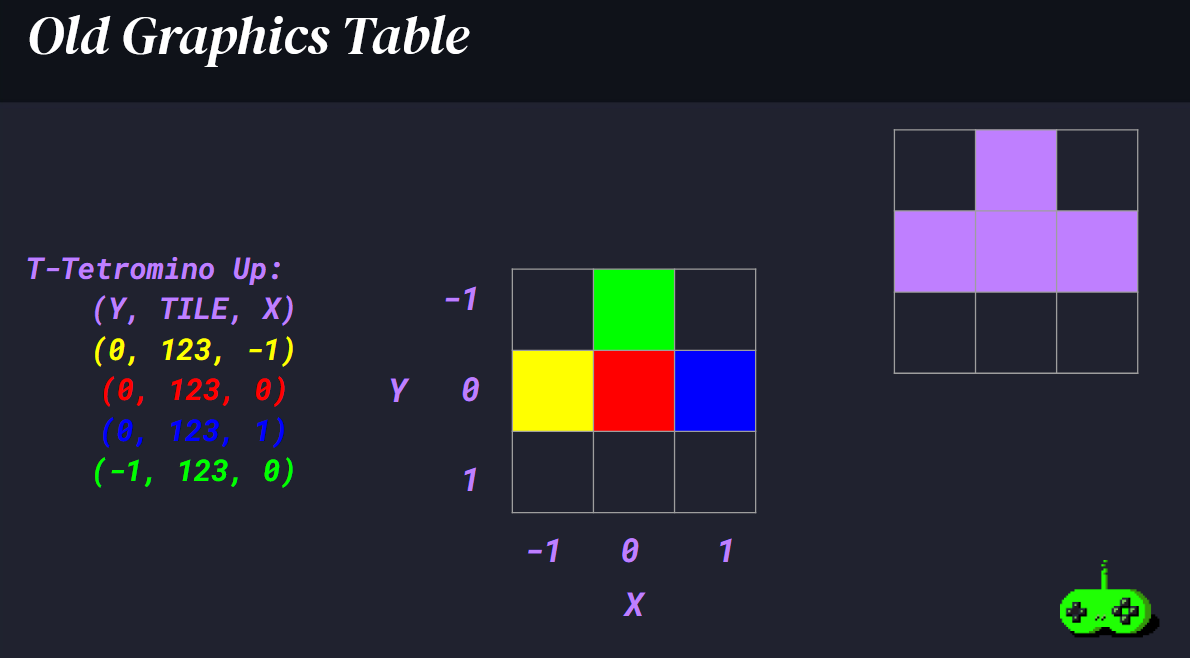
Each tetromino has 4 pieces, and each piece has 3 bytes allocated to it, telling the game its tile graphic to use, and its X and Y position in a grid. This slide I made for my school presentation does a great job of visualizing it:
The original orientation table is 240 bytes total. But, when we add the necessary information for the new blocks both in and outside the orientation table, our new orientation table is 312 bytes! Now remember, the NES is an 8-bit computer, meaning it only works in values of 1 byte at a time… meaning the largest value in an NES at any time is 255.
So, when our original table was less than 255 bytes, we could easily index into it as needed. But the moment we added indexes larger than 255, our game started to crash! And wouldn’t you know it? The way we’ve reordered the orientation table has our O and I blocks located just past the 255th index. This explains why the game crashed when we spawned in an O-block, and why it would also crash when we spawn in an I-block.
As for why the statistics on the side of the screen aren’t updating properly, I have yet to tackle that.
The Solution?
As even a novice programmer could probably tell, the old table uses a lot of unnecessary space for storing the same tile bytes over and over again. So, I devised my own format for the table, as shown:
tiles:
    .byte tile1, tile3, tile2, tile2, tile3, tile1, tile1, tileHidden

orientationTable:
    .byte    0,-1, 0, 0, 0, 1,-1, 0 ; $00 t up
    .byte   -1, 0, 0, 0, 0, 1, 1, 0 ; $01 t right
    .byte    0,-1, 0, 0, 0, 1, 1, 0 ; $02 t down (spawn)
    .byte   -1, 0, 0,-1, 0, 0, 1, 0 ; $03 t left

    ...

    ; Hidden orientation used during line clear animation and game over curtain
    .byte    0, 0, 0, 0, 0, 0, 0, 0 ; $19
As you can probably already tell, the new table is way smaller, but get this! The table used in the original game uses:
(3 bytes per piece) * (4 pieces per orientation) * (20 orientations) = 240 bytes
And this new, optimized pair of tables would use:
(2 bytes per piece) * (4 pieces per orientation) * (26 orientations) + (8 tile bytes) = 216 bytes
That’s right, even though we’ve added in what are essentially another 6 brand new pieces/orientations, we’re actually smaller than the original game’s table if we use this new format!! Pretty amazing stuff if you ask me.
What’s Next?
Simple. We just need to look through the code and change how the orientation table is being accessed. In my search, I found 10 references to the table across 4 functions. That means we’ll likely be needing to change the logic in those areas at least.
I’ve been fortunate enough that I haven’t had to really touch much assembly code so far, mostly just diagnosing, changing/adding bytes, and learning formats up to now. However, it looks like it’ll finally be time for me to get my hands dirty with the logic!
Also, here’s an old Python script from my school project I was able to get working that let me more easily visualize the table I was modifying :)
Final Thoughts
Honestly, this week was really good in terms of progress! With all these changes and advancements, I was able to essentially get back to where I last left the project in school. The road ahead is clear, and I’m looking forward to brushing up on my assembly! We’ll see what I can do in the meantime; it’ll likely be tougher to work on this now that I’ve recently started working for a start-up, which I’ll likely talk about at some point in the future. Oh well, until next time!
“He that breaks a thing to find out what it is has left the path of wisdom.” J.R.R. Tolkien